Fija vault analysis
Run
erc-4626-single-vault.ipynbanalysis for all Fija
To generate a a HTML report:
jupyter nbconvert --no-input --to html docs/source/tutorials/erc-4626-fija-vaults.ipynb
mv docs/source/tutorials/erc-4626-fija-vaults.html ~/Downloads
Setup
Set up notebook rendering output mode
Use static image charts so this notebook is readeable on Github / ReadTheDocs
[17]:
import pandas as pd
from plotly.offline import init_notebook_mode
import plotly.io as pio
from eth_defi.vault.base import VaultSpec
from eth_defi.research.notebook import set_large_plotly_chart_font
pd.options.display.float_format = "{:,.2f}".format
pd.options.display.max_columns = None
pd.options.display.max_rows = None
# Set up Plotly chart output as SVG
image_format = "png"
width = 1400
height = 800
# https://stackoverflow.com/a/52956402/315168
init_notebook_mode()
# https://plotly.com/python/renderers/#overriding-the-default-renderer
pio.renderers.default = image_format
current_renderer = pio.renderers[image_format]
# Have SVGs default pixel with
current_renderer.width = width
current_renderer.height = height
# Set all Plotly charts to use large font sizes for better readability,
# for sharing on mobile
set_large_plotly_chart_font(
line_width=5,
legend_font_size=16,
axis_title_font_size=16,
font_size=20,
)
pio.templates.default = "custom"
print("Notebook formatting setup done")
Notebook formatting setup done
Read and clean raw scanned vault price data
Read the Parquet file produced earlier with price scan
Clean the data if necessary
[18]:
import pickle
from pathlib import Path
from eth_defi.vault.vaultdb import VaultDatabase
data_folder = Path("~/.tradingstrategy/vaults").expanduser()
vault_db_path = data_folder / "vault-db.pickle"
vault_db: VaultDatabase = pickle.load(open(vault_db_path, "rb"))
cleaned_data_parquet_file = data_folder / "cleaned-vault-prices-1h.parquet"
prices_df = pd.read_parquet(cleaned_data_parquet_file)
print(f"We have {len(vault_db):,} vaults in the database and {len(prices_df):,} price rows.")
We have 10,357 vaults in the database and 8,393,611 price rows.
Choose vaults to examine
We pick Fija vaults by their name
[19]:
from eth_defi.vault.base import VaultSpec
from eth_defi.vault.vaultdb import VaultLead
from eth_defi.research.vault_metrics import format_vault_database
def _lower_name(v: VaultLead):
name = v["Name"]
if name:
return name.lower()
return ""
# Map out vaults we are going to examine in this notebook
leads = {spec: vault for spec, vault in vault_db.items() if "fija" in _lower_name(vault)}
vault_df = format_vault_database(leads, index=False)
vault_df = vault_df.set_index("Name")
vault_df = vault_df.sort_values("NAV", ascending=False)
vault_df = vault_df[vault_df["Deposit count"] > 40]
display(vault_df)
| Symbol | Address | Denomination | NAV | Protocol | Mgmt fee | Perf fee | Shares | First seen | _detection_data | _denomination_token | _share_token | Chain | Protocol identified | Stablecoin denominated | ERC-7540 | ERC-7575 | Fee detected | Deposit count | Redeem count | Total events | Age | |
|---|---|---|---|---|---|---|---|---|---|---|---|---|---|---|---|---|---|---|---|---|---|---|
| Name | ||||||||||||||||||||||
| fija Strategy USDC GMXv2 | sUSDC_GMXv2 | 0xadbb6ec1d07b0e9708451fd657e7812327ec6501 | USDC | 1,231,545.17 | <unknown ERC-4626> | <unknown> | <unknown> | 1200726.03948 | 2024-12-12 13:30:29 | ERC4262VaultDetection(chain=42161, address='0x... | {'name': 'USD Coin', 'symbol': 'USDC', 'total_... | {'name': 'fija Strategy USDC GMXv2', 'symbol':... | Arbitrum | False | True | False | False | False | 1296 | 270 | 1566 | 224 days 23:00:57.677211 |
| fija Strategy crvUSD CurveConvex | scrvUSD_CC | 0x6155c331aa73a9872b22871eb6d7516c6fb52a69 | crvUSD | 1,073,580.29 | <unknown ERC-4626> | <unknown> | <unknown> | 939563.649206483304142095 | 2023-10-19 13:01:47 | ERC4262VaultDetection(chain=1, address='0x6155... | {'name': 'Curve.Fi USD Stablecoin', 'symbol': ... | {'name': 'fija Strategy crvUSD CurveConvex', '... | Ethereum | False | True | False | False | False | 41 | 16 | 57 | 644 days 23:29:39.677211 |
| fija USDC GMXv2 RY | fUSDC_GMXv2 | 0xf5b7ac0afbe08ffa7b4bd9bd4e6d678201356658 | USDC | 223,035.20 | <unknown ERC-4626> | <unknown> | <unknown> | 225232.348031 | 2024-10-30 09:21:01 | ERC4262VaultDetection(chain=42161, address='0x... | {'name': 'USD Coin', 'symbol': 'USDC', 'total_... | {'name': 'fija USDC GMXv2 RY', 'symbol': 'fUSD... | Arbitrum | False | True | False | False | False | 755 | 177 | 932 | 268 days 03:10:25.677211 |
| fija USDC GMXv2 FIAX | fUSDC | 0x4f7f56c6833b7ae211f8cd2563d0728252b2b088 | USDC | 18,580.67 | <unknown ERC-4626> | <unknown> | <unknown> | 18899.453822 | 2025-05-02 10:20:31 | ERC4262VaultDetection(chain=42161, address='0x... | {'name': 'USD Coin', 'symbol': 'USDC', 'total_... | {'name': 'fija USDC GMXv2 FIAX', 'symbol': 'fU... | Arbitrum | False | True | False | False | False | 124 | 112 | 236 | 84 days 02:10:55.677211 |
Grab the filtered in vault ids for the rest of the notebook.
[20]:
VAULTS = [spec for spec, row in leads.items() if spec.vault_address in vault_df["Address"].values]
print(f"Examining {len(VAULTS):,} vaults.")
Examining 4 vaults.
Calculate reports
Calculate vault reports for all vaults
[21]:
from eth_defi.research.vault_metrics import analyse_vault
reports = {}
for vault_spec in VAULTS:
vault_report = analyse_vault(
vault_db=vault_db,
prices_df=prices_df,
spec=vault_spec,
chart_frequency="daily",
)
if vault_report is not None:
reports[vault_spec] = vault_report
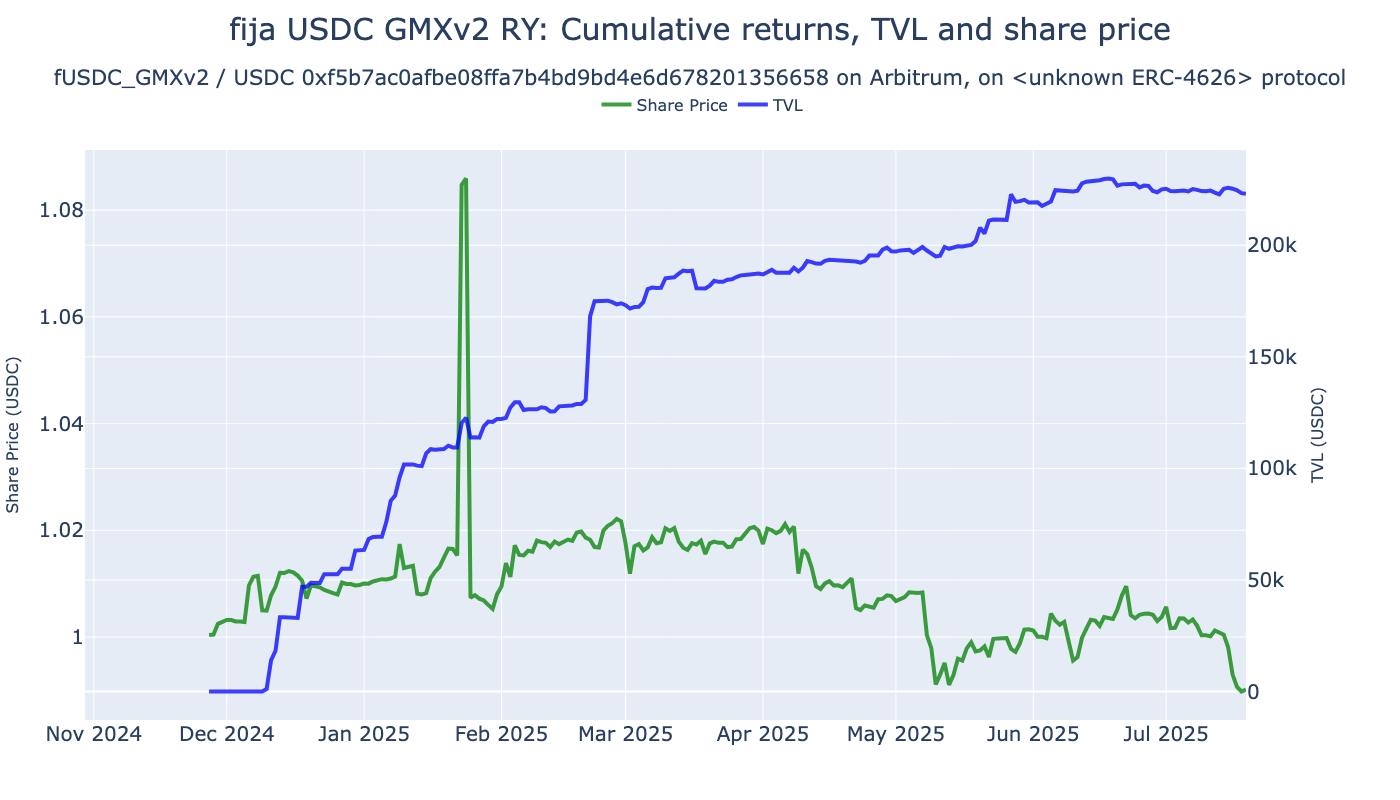
Examining vault fija USDC GMXv2 RY: 42161-0xf5b7ac0afbe08ffa7b4bd9bd4e6d678201356658, having 5,415 raw returns, 5,414 hourly and 235 daily returns
Share price movement: 1.0090 2024-10-30 09:34:08 -> 0.9901 2025-07-19 14:36:29
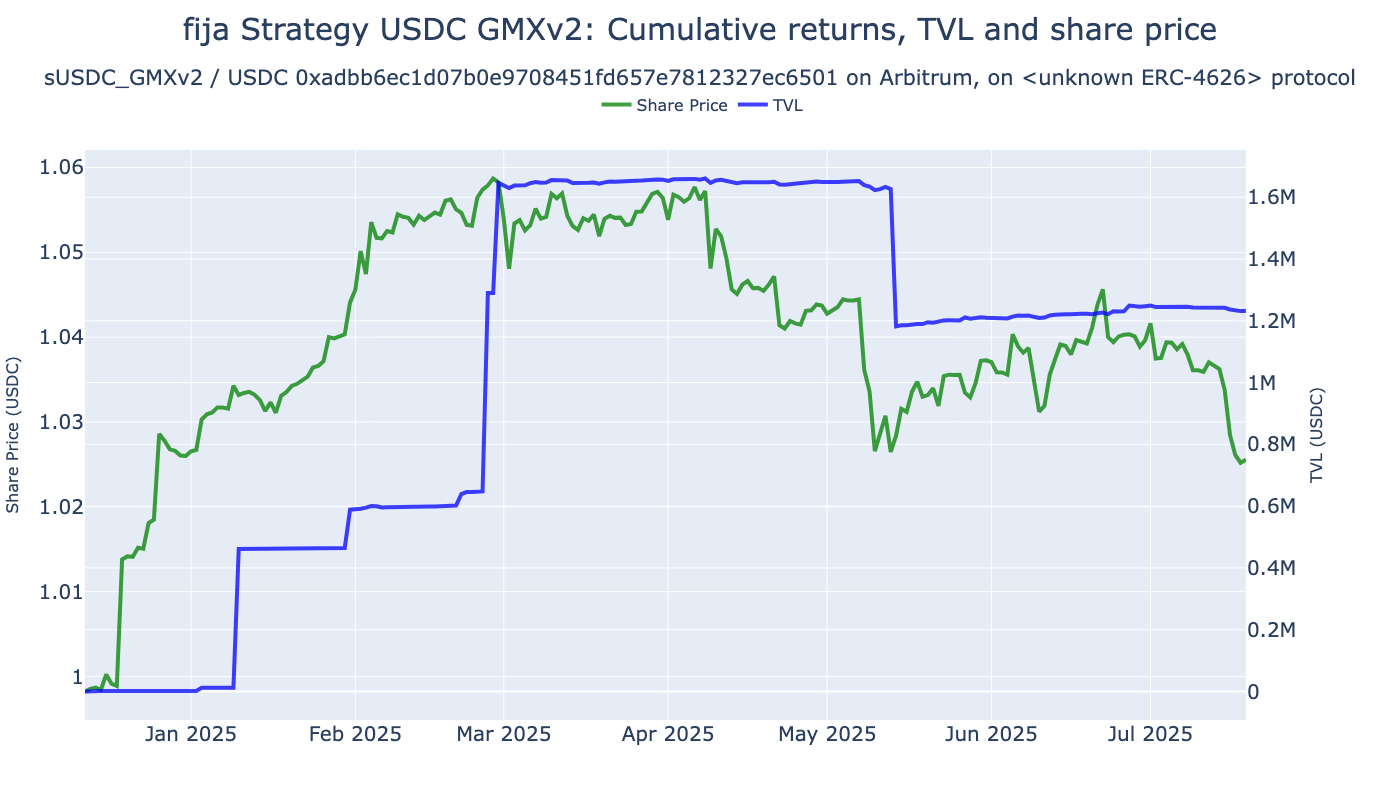
Examining vault fija Strategy USDC GMXv2: 42161-0xadbb6ec1d07b0e9708451fd657e7812327ec6501, having 4,967 raw returns, 4,966 hourly and 219 daily returns
Share price movement: 0.9988 2024-12-12 13:32:24 -> 1.0256 2025-07-19 14:36:29
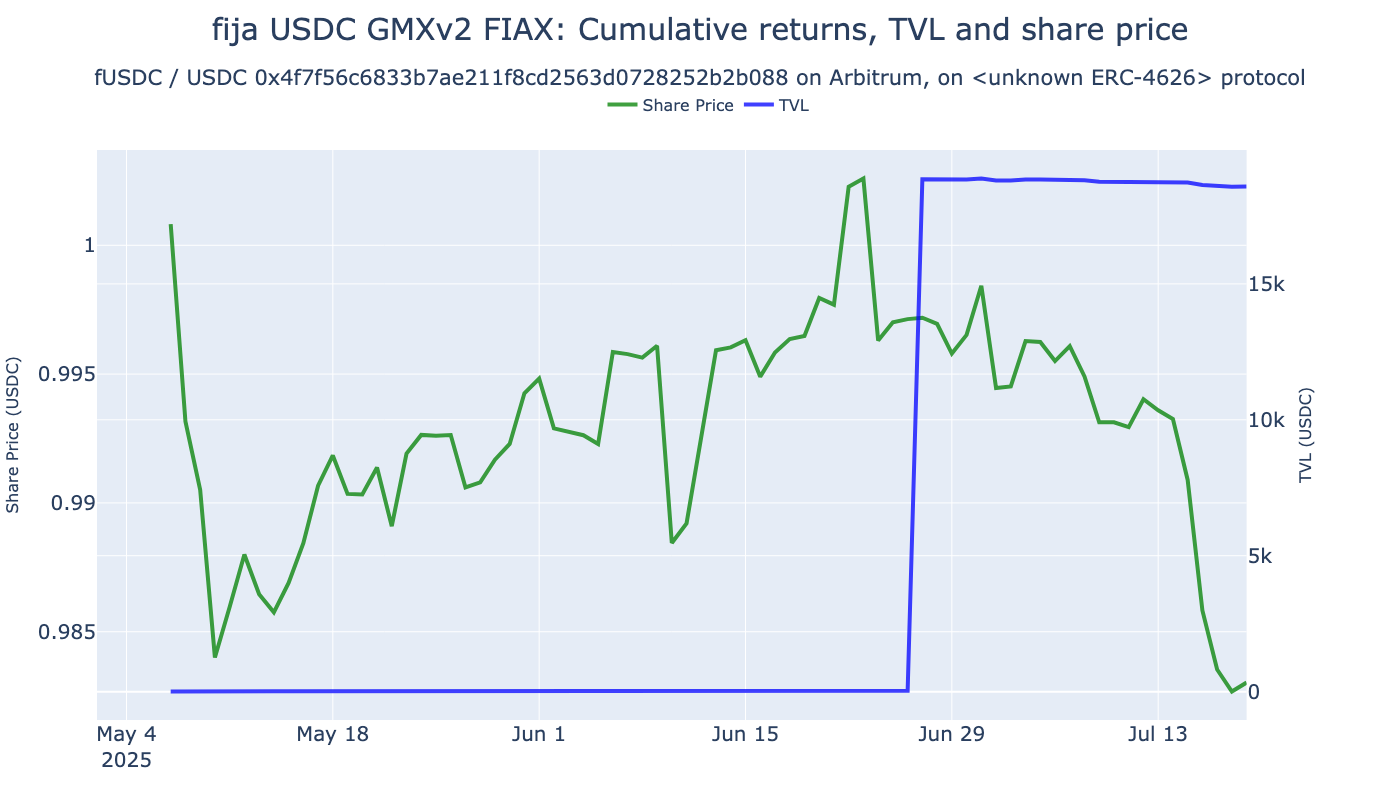
Examining vault fija USDC GMXv2 FIAX: 42161-0x4f7f56c6833b7ae211f8cd2563d0728252b2b088, having 1,172 raw returns, 1,171 hourly and 74 daily returns
Share price movement: 0.9998 2025-05-02 11:19:13 -> 0.9830 2025-07-19 14:36:29
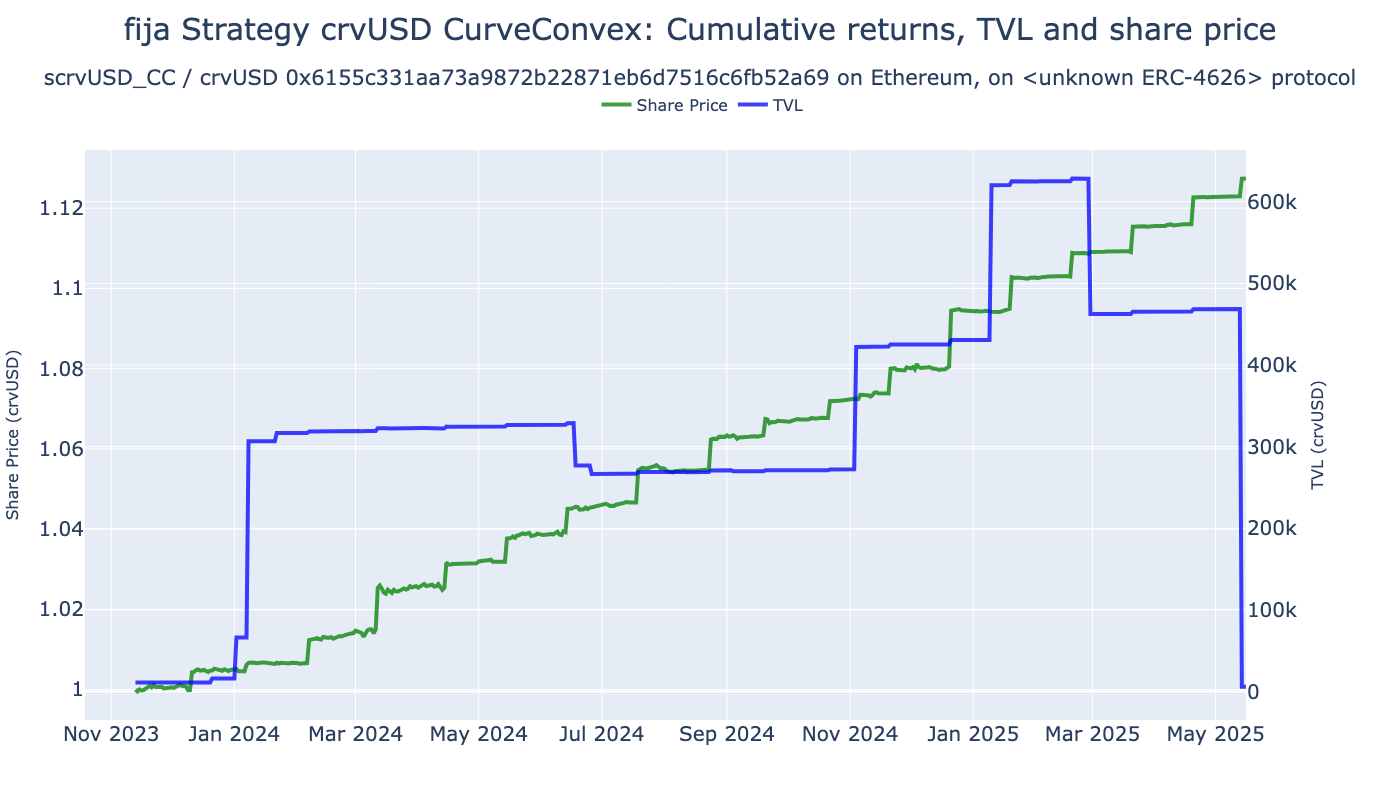
Examining vault fija Strategy crvUSD CurveConvex: 1-0x6155c331aa73a9872b22871eb6d7516c6fb52a69, having 13,110 raw returns, 13,109 hourly and 551 daily returns
Share price movement: 0.9999 2023-10-19 13:54:11 -> 1.1274 2025-05-16 08:37:59
Comparison table for portfolio key metrics
Create a comparison matrix of key metrics, each vault being one column
[22]:
from eth_defi.research.vault_metrics import format_vault_header
from eth_defi.research.vault_metrics import format_ffn_performance_stats
columns = []
for spec, report in reports.items():
vault_row = vault_df[vault_df["Address"] == spec.vault_address].iloc[0]
vault_row["Name"] = vault_row.name # Index remaap
header = format_vault_header(vault_row)
column_series = format_ffn_performance_stats(report.performance_stats, prefix_series=header)
columns.append(column_series)
# print(columns)
df = pd.DataFrame(columns).set_index("Name").T
display(df)
| Name | fija USDC GMXv2 RY | fija Strategy USDC GMXv2 | fija USDC GMXv2 FIAX | fija Strategy crvUSD CurveConvex |
|---|---|---|---|---|
| Chain | Arbitrum | Arbitrum | Arbitrum | Ethereum |
| Address | 0xf5b7ac0afbe08ffa7b4bd9bd4e6d678201356658 | 0xadbb6ec1d07b0e9708451fd657e7812327ec6501 | 0x4f7f56c6833b7ae211f8cd2563d0728252b2b088 | 0x6155c331aa73a9872b22871eb6d7516c6fb52a69 |
| Denomination | USDC | USDC | USDC | crvUSD |
| NAV | 223,035.20 | 1,231,545.17 | 18,580.67 | 1,073,580.29 |
| First seen | 2024-10-30 09:21:01 | 2024-12-12 13:30:29 | 2025-05-02 10:20:31 | 2023-10-19 13:01:47 |
| Total events | 932 | 1566 | 236 | 57 |
| Age | 268 days 03:10:25.677211 | 224 days 23:00:57.677211 | 84 days 02:10:55.677211 | 644 days 23:29:39.677211 |
| Start | 2024-10-30 | 2024-12-12 | 2025-05-02 | 2023-10-19 |
| End | 2025-07-19 | 2025-07-19 | 2025-07-19 | 2025-05-16 |
| Risk-free rate | 0.00% | 0.00% | 0.00% | 0.00% |
| Total Return | -1.86% | 2.74% | -1.68% | 12.75% |
| CAGR | -2.59% | 4.61% | -7.62% | 7.92% |
| Max Drawdown | -8.85% | -3.16% | -1.99% | -0.20% |
| Calmar Ratio | -0.29 | 1.46 | -3.84 | 40.43 |
| MTD | -1.35% | -1.35% | -1.35% | 0.41% |
| 3m | -1.90% | -1.90% | - | 2.21% |
| 6m | -2.44% | -0.77% | - | 4.99% |
| YTD | -1.94% | -0.04% | -1.68% | 3.02% |
| 1Y | - | - | - | 8.64% |
| 3Y (ann.) | - | - | - | 7.92% |
| 5Y (ann.) | - | - | - | - |
| 10Y (ann.) | - | - | - | - |
| Since Incep. (ann.) | -2.59% | 4.61% | -7.62% | 7.92% |
| Daily Sharpe | -0.13 | 0.87 | -1.55 | 2.93 |
| Daily Sortino | -0.18 | 1.47 | -2.01 | 23.05 |
| Daily Mean (ann.) | -1.43% | 3.17% | -5.69% | 5.51% |
| Daily Vol (ann.) | 10.88% | 3.63% | 3.67% | 1.88% |
| Daily Skew | -0.79 | 0.92 | -1.30 | 6.23 |
| Daily Kurt | 95.07 | 10.60 | 2.78 | 45.47 |
| Best Day | 6.84% | 1.49% | 0.46% | 1.29% |
| Worst Day | -7.24% | -0.86% | -0.77% | -0.10% |
| Monthly Sharpe | -0.82 | 0.00 | -1.74 | 7.42 |
| Monthly Sortino | -1.36 | 0.00 | -2.04 | inf |
| Monthly Mean (ann.) | -2.47% | 0.00% | -6.76% | 7.61% |
| Monthly Vol (ann.) | 3.02% | 4.17% | 3.87% | 1.03% |
| Monthly Skew | 0.48 | 0.47 | - | 0.34 |
| Monthly Kurt | -0.20 | -1.25 | - | 1.13 |
| Best Month | 1.36% | 1.76% | 0.23% | 1.32% |
| Worst Month | -1.35% | -1.35% | -1.35% | 0.04% |
| Yearly Sharpe | - | - | - | 1.43 |
| Yearly Sortino | - | - | - | inf |
| Yearly Mean | -1.94% | -0.04% | - | 5.96% |
| Yearly Vol | - | - | - | 4.16% |
| Yearly Skew | - | - | - | - |
| Yearly Kurt | - | - | - | - |
| Best Year | -1.94% | -0.04% | - | 8.90% |
| Worst Year | -1.94% | -0.04% | - | 3.02% |
| Avg. Drawdown | -1.96% | -0.34% | -1.83% | -0.04% |
| Avg. Drawdown Days | 37.67 | 13.07 | 35.00 | 5.34 |
| Avg. Up Month | 0.76% | 1.12% | 0.23% | 0.63% |
| Avg. Down Month | -0.69% | -0.84% | -1.35% | - |
| Win Year % | 0.00% | 0.00% | - | 100.00% |
| Win 12m % | - | - | - | 100.00% |
Vault charts
Examine vault metrics and charts
[23]:
from eth_defi.research.vault_metrics import analyse_vault
for spec, vault_report in reports.items():
# Display returns figur
returns_chart_fig = vault_report.rolling_returns_chart
returns_chart_fig.show()
Returns comparison chart
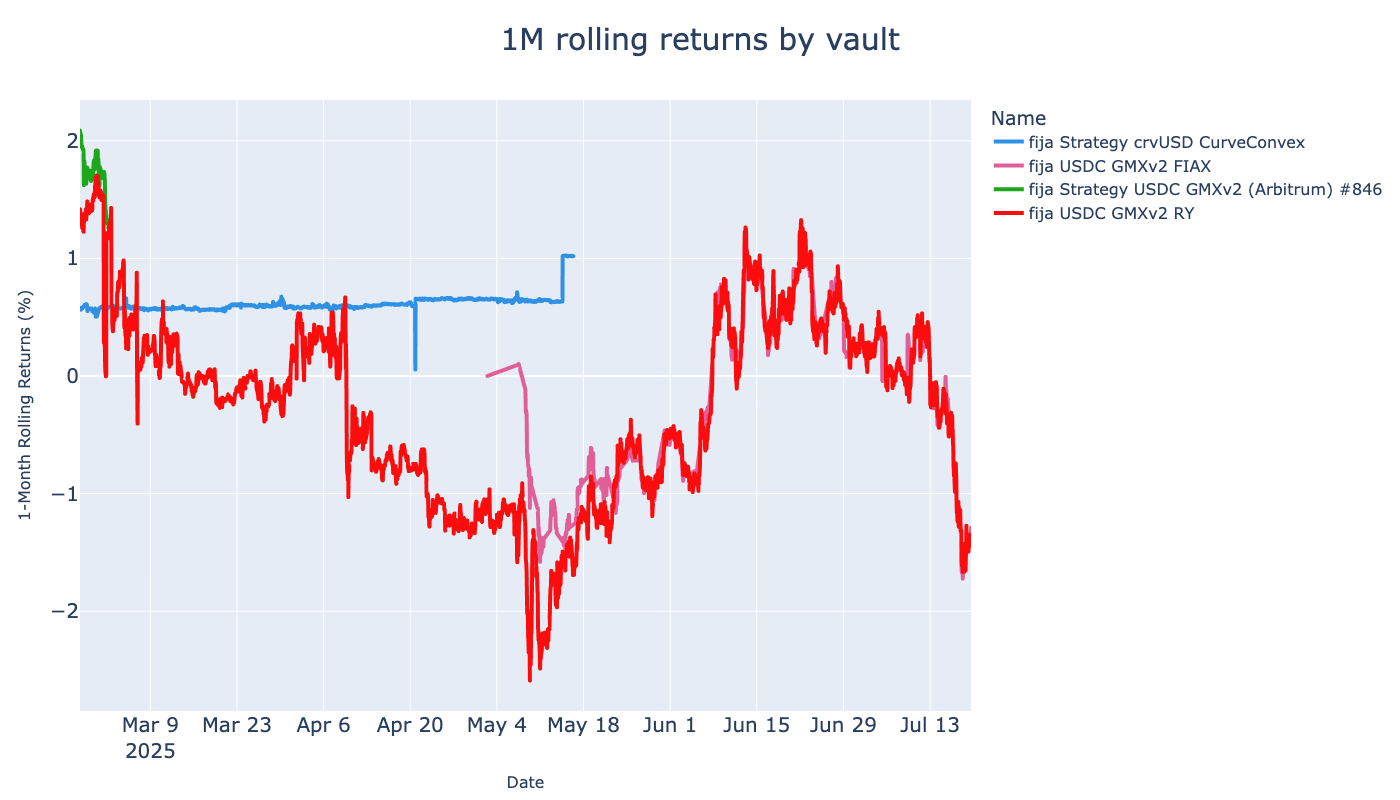
Show rolling returns of all picked vaults
[24]:
from eth_defi.research.rolling_returns import calculate_rolling_returns, visualise_rolling_returns
interesting_vaults = [spec.as_string_id() for spec in VAULTS]
rolling_returns_df = calculate_rolling_returns(
prices_df,
interesting_vaults=interesting_vaults,
clip_up=50,
)
# display(rolling_returns_df.head(3))
fig = visualise_rolling_returns(rolling_returns_df)
fig.show()